TapSwap Telegram Mini-App: How It Works, How to Farm, and What to Watch Out For
TapSwap is one of those Telegram mini-apps that suddenly shows up everywhere. Friends send invite links, crypto Twitter talks about it, and you keep seeing screenshots of people flexing huge balances.
If you open it for the first time, though, it’s not immediately obvious what you’re supposed to do or how any of this might turn into real rewards later.
This guide walks through TapSwap step by step:
- how to open the real TapSwap mini-app on Telegram
- how the tapping, energy and upgrades work
- what daily routines actually make sense
- and the main red flags to avoid while you test it
It’s written for normal users, not crypto pros, so you can just follow along and decide for yourself if it’s worth your time.
Quick Start: How to Open and Play TapSwap on Telegram
Let’s start with the part that confuses most people: actually getting the game open inside Telegram, especially on desktop.
1. Open the official TapSwap bot
You can do this in two ways:
Option A – From inside Telegram
- Open the Telegram app (desktop or mobile).
- In the search bar at the top, type:
TapSwap. - In the global search results you’ll usually see:
tapswap community– the announcement channel.TapSwapwith a blue check – this is the game bot (@tapswap_bot).
- Click the verified TapSwap bot (the one with the blue check).
Option B – Using the direct link
If you prefer a direct link, you can use:
That opens the same verified bot in Telegram.
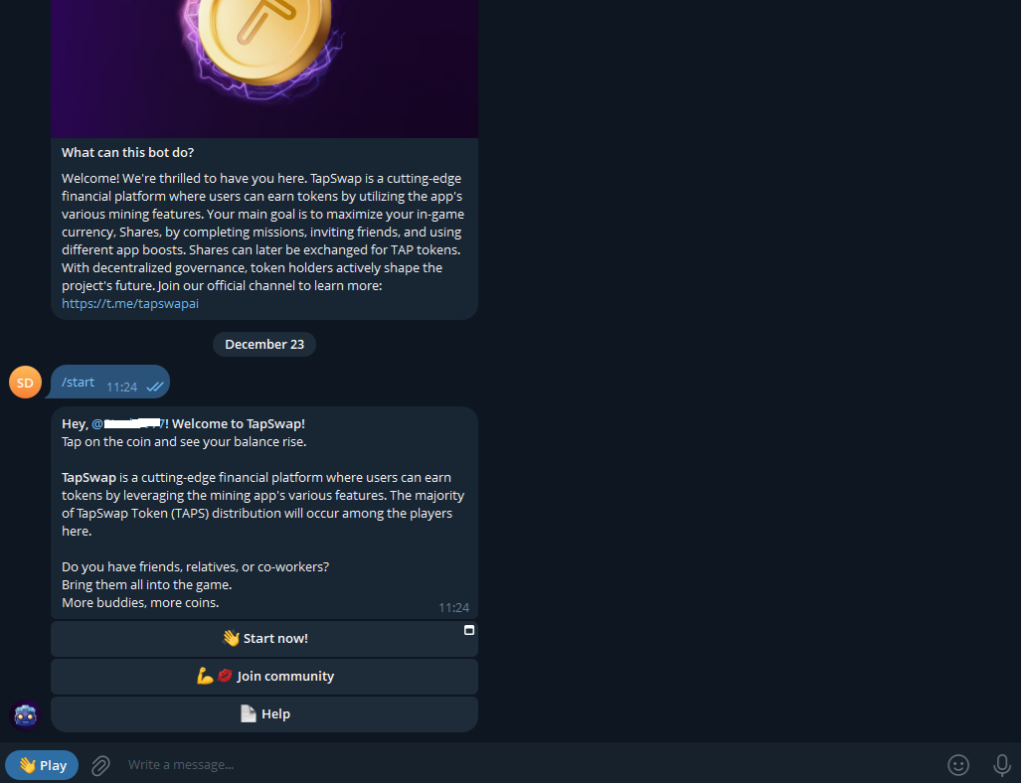
2. Start the bot and open the mini-app
Inside the @tapswap_bot chat:
- Click Start (or tap
/startif you see it). - The bot will send you a message with a large button such as “Open app” or “Play”.
- Click that button.
- The TapSwap mini-app window opens inside Telegram with the main game screen.
If you only see text messages and no app:
- scroll up in the chat and look for the “Open app / Play” button again,
- click it one more time.
3. First actions once the game screen is open
On the main TapSwap screen you’ll see:
- your coins / points at the top
- an energy bar
- a large area or button where you tap
- some small icons for Boosts, Tasks, Friends, etc.
To get started:
- Click in the tapping area several times – your coin total should go up.
- Watch the energy bar slowly drain as you click.
- When you’ve earned a small chunk of coins, open the Boosts / Upgrades section.
- Buy a basic upgrade (tap power or energy) and go back to tapping.
That’s the basic loop. The rest of this guide just explains how to do it without wasting time or getting into sketchy territory.
What TapSwap Actually Is
TapSwap is a tap-to-earn game that runs as a Telegram mini-app. You don’t install it from the App Store or Google Play; it lives entirely inside Telegram.
At a simple level, it’s three things:
- A clicker game – you tap, your score goes up.
- A progression system – you use that score to upgrade power, energy and passive income.
- A speculative crypto experiment – at some point the team may use your in-game points to decide who gets tokens or other rewards.
The important mindset:
Treat TapSwap as a game with possible upside, not as guaranteed income.
Things like snapshots, tokens and airdrops can change, be delayed, or end up being worth very little. If it pays off, great. If not, it should still have only cost you a bit of spare time.
Main Screen, Tapping and Energy
Once the mini-app is open, everything revolves around the main “farm” screen.
Here’s what each part usually means:
- Coin / point balance – the big number at the top. This is what all your tapping, tasks and upgrades are building.
- Energy bar – limits how long you can tap in one session. Tapping uses energy, and it refills gradually over time.
- Tap area – where you click to earn coins. As you upgrade, each tap is worth more.
- Menu icons – usually along the bottom or sides:
- Boosts / Upgrades
- Tasks / Earn
- Friends / Referrals
- Maybe a settings / info section
How tapping actually works
- Every tap gives you a base amount of coins.
- The base amount increases as you upgrade tap power.
- Each tap also consumes a bit of energy; when energy hits zero, you can’t keep farming until it refills.
Because energy refills on its own over time, TapSwap works best in short sessions, not long marathons:
- Open the game → spend most of your energy tapping → buy some upgrades → close it and let energy refill.
- Repeat later in the day.
Think of it like an idle mobile game with scheduled check-ins, not something that needs constant attention.
Boosts and Upgrades: Where Progress Really Comes From
Tapping matters, but upgrades matter more. The whole idea is to slowly move from “each tap is tiny” to “each tap and each hour offline is worth a lot more”.
Exact upgrade names can change over time, but they usually fall into a few buckets.
Common TapSwap upgrade types
- Tap power
- Increases the number of coins you get per tap.
- This is often the best early upgrade: it makes every tap more valuable.
- Energy capacity
- Increases the size of your energy bar.
- Longer tapping sessions before you hit zero energy.
- Energy regeneration
- Speeds up how quickly your energy bar refills over time.
- Important once you’re checking the game several times a day.
- Passive income / auto-farm
- Lets your coins go up even when you’re offline.
- Sometimes this is very strong, sometimes not; depends how TapSwap tunes it.
- Multipliers and special boosts
- Temporary x2 or x3 bonuses.
- Event boosts that apply during specific windows or tasks.
Simple upgrade strategy
Early on:
- Focus on tap power + energy capacity.
- A few upgrades here make short sessions much more rewarding.
Once that feels decent:
- Add some energy regen so your bar is useful whenever you come back.
- Pick up passive income if it clearly shows big gains while you’re offline.
Later:
- Use spare coins on multipliers that give noticeable boosts.
- Ignore tiny “+1%” upgrades if they barely move your numbers.
If an upgrade doesn’t clearly improve:
- how much you earn per tap,
- how long you can tap, or
- what you earn while you sleep…
…it’s usually safe to skip or delay.
Tasks and Missions: Extra Coins vs Noise
TapSwap has a Tasks / Earn / Missions tab that throws extra rewards at you for doing small actions.
Typical tasks include:
- daily login / streak rewards
- joining official TapSwap channels
- following partner projects
- watching or tapping through promos
- sometimes mini-quests inside the app
These tasks are where a lot of people accidentally turn their Telegram into a spam mess. A simple way to handle them without going crazy:
Good tasks to do
- Daily login / streaks – quick, safe, easy.
- Official TapSwap channel tasks – joining the main community / announcement channel is normal.
- Anything that feels like:
- one click,
- decent reward,
- from a project you don’t mind seeing again.
Tasks to think twice about
- Joining random unknown channels that look like low-effort hype.
- Anything that pushes very aggressive “invest now / buy now” messages.
- Tasks that ask you to leave Telegram and sign up somewhere sketchy.
A nice routine is:
- Once a day:
- Tap “Tasks”,
- Clear the obvious ones (login, official channels),
- Pick 1–2 partner tasks if they look reasonable,
- Ignore everything that smells like spam.
Referrals and Multiple Accounts
TapSwap, like most of these games, rewards you for inviting other people.
Inside the app there’s usually a Referrals / Friends / Invite section where you can:
- copy your invite link,
- share it on Telegram or elsewhere,
- see how many people joined through you and what bonus you got.
Referrals can be a nice boost, but they are not required to play. You can farm just fine with zero invites; your balance just grows slower.
What’s not worth doing
- Spamming your link in random channels and comments – you’ll get banned or muted.
- Buying fake referrals or using bot farms – when TapSwap cleans up accounts around a snapshot, those patterns are exactly what they look for.
About multiple accounts
It’s tempting to:
- create several Telegram accounts,
- connect each to TapSwap,
- combine rewards later.
But:
- TapSwap can monitor activity patterns and device usage.
- If they decide to crack down before a token event, multiple low-quality accounts can easily get flagged and excluded.
Safest approach:
- Use one main Telegram account.
- If friends or family want to try it, let them join with your link, but treat each as a real person, not a bot.
Snapshots, Rewards and What Your Balance Might Mean
The big question everyone asks is “When do I actually get something from this?”
Usually, clicker-style mini-apps follow some version of this pattern:
- You farm points / coins during a season.
- The team announces a snapshot date or window.
- At snapshot, they record each account’s balance / rank.
- Later, they use that snapshot to distribute:
- tokens,
- in-game benefits,
- or some blend of both.
Important points to keep in mind:
- Snapshot rules can change.
- They can add:
- minimum thresholds,
- anti-bot filters,
- bonus multipliers for certain behaviors.
- There is no guarantee that rewards will be large or even tradable.
The only way to know what’s going on right now is to:
- follow the official TapSwap community channel (
tapswap community), - read pinned messages and announcements inside the mini-app.
Anything you see in random groups or comments should be treated as rumor until TapSwap itself confirms it.
Wallets, Tokens and Exchanges (If It Gets That Far)
At some point TapSwap may ask you to connect a crypto wallet or interact with an exchange to claim rewards.
General safety rules that apply to every mini-app:
- Never enter your seed phrase or private key anywhere in TapSwap.
- Use a separate wallet just for experiments like this, not the one where you store real money.
- Double-check any external URLs:
- does the domain match what TapSwap announced?
- is the connection secure (https)?
- When in doubt, don’t connect anything. Wait for clearer instructions.
The most common safe pattern is:
- The mini-app opens a page where you connect a wallet,
- You sign a simple message (not a transaction) to prove it’s yours,
- If there’s an airdrop, tokens get sent there later,
- You can then decide what to do with them on a normal exchange.
Anything pushing you to:
- deposit large amounts,
- pay to “unlock” rewards,
- or give full control of your wallet
is not worth dealing with.
A Simple Daily TapSwap Routine
To keep TapSwap in the “fun experiment” bucket instead of a time sink, a small routine is enough.
Here’s one that works without taking over your day:
Once or twice a day:
- Open TapSwap from the
@tapswap_botchat. - Spend most of your current energy tapping.
- Open Boosts / Upgrades:
- Buy tap power and energy upgrades first,
- Add some passive/regen if they’re available and strong.
- Open Tasks / Missions:
- Claim daily login / streak rewards,
- Join or interact with the official TapSwap channel,
- Do 1–2 partner tasks if they look safe and worthwhile.
- Close the app and let energy refill.
That’s it.
If you feel like checking more often, you can, but there’s no real need to turn this into a full-time hobby.
Red Flags to Watch Out For
Because TapSwap lives in Telegram, it shares the same problem as every other popular bot: clones and scammers.
Here are the main things to watch for.
1. Fake bots with similar names
- Some bots use names like
tapswap_mirror_botor extra emojis. - Others pretend to be “TapSwap support” or “TapSwap gifts”.
Stick to:
- the verified
TapSwapbot (@tapswap_bot) for the game, and - the official
tapswap communitychannel for news.
If a bot has almost no users or looks off brand, skip it.
2. Requests for secret information
No real mini-app needs your:
- wallet seed phrase
- private keys
- exchange password
If you ever see a form or bot asking for those, close it immediately.
3. Random DMs from “admins”
Scammers love to:
- DM players saying they’re “TapSwap admin/support”,
- claim there’s an issue with your rewards,
- ask you to click a link or pay a fee “to unlock.”
Real projects post announcements publicly in official channels. They don’t hunt you down in private chats.
4. Over-investing time or money
Some people end up:
- tapping for hours a day,
- buying expensive boosts,
- or emotionally tying themselves to a possible big payout.
Your balance is just numbers in a game until a real token exists and you’ve actually withdrawn something. Don’t risk more time or money than you’d be okay losing.
Where TapSwap Fits Among Telegram Mini-App Games
TapSwap isn’t the only game in town. It lives in the same ecosystem as:
- Hamster Kombat
- Notcoin
- Yescoin
- Catizen
- Paws
- Rocky Rabbit
- RollerTap
- and a growing list of others
They all follow a similar pattern:
- easy tapping / swiping gameplay,
- upgrade trees,
- social tasks,
- and some kind of token or reward story.
The upside is that once you understand one of them – like TapSwap – the others feel familiar. You can decide which ones are worth your 10 minutes a day and which ones are just noise.
Final Thoughts
TapSwap is a mix of:
- simple tapping game,
- social mini-app,
- and speculative crypto experiment.
Used in a calm way, it’s a fun way to explore how Telegram mini-apps and tokenized games work. Used in a frantic, FOMO-driven way, it can eat a lot of time for an outcome nobody can promise.
If you want to try it:
- open the verified
@tapswap_botviahttps://t.me/tapswap_botor Telegram search, - set yourself a small daily time limit,
- focus on smart upgrades and easy daily tasks,
- and stay very sceptical of anything involving private keys or big promises.
That’s enough to see what TapSwap is about, keep your risk low, and be ready if the team actually turns those on-screen points into something more later.