Notcoin on Telegram: How to Use the New Not Games Hub (Step-by-Step)
Notcoin has changed a lot.
Old guides still talk about “tap to mine NOT” on a gold circle, but that season is over. Now the Notcoin bot is more like a portal:
- a place to learn what $NOT is,
- a place to buy/swap the token,
- and a launching pad for a separate mini-app called Not Games, where you actually play games and earn in-app items.
The flow is a bit confusing when you see it the first time: bot → mini-app → another bot → another mini-app → then finally the games list.
This guide walks you through that exact path, using the same flow you showed in your screenshots:
- Open the official Notcoin bot
- Open the Notcoin in-Telegram app
- Jump into the Not Games hub
- Find and launch games (Glance, Runners, Koronki, etc.)
- Understand how your profile, items and $NOT fit together
- Stay safe around clones, fake links and token hype
Everything here is written for normal users, not crypto pros.
1. Start with the official Notcoin bot (@notcoin_bot)
There are a lot of “Notcoin something” bots on Telegram. You want the main verified one.
How to open it
Inside Telegram (desktop or mobile):
- Open Telegram.
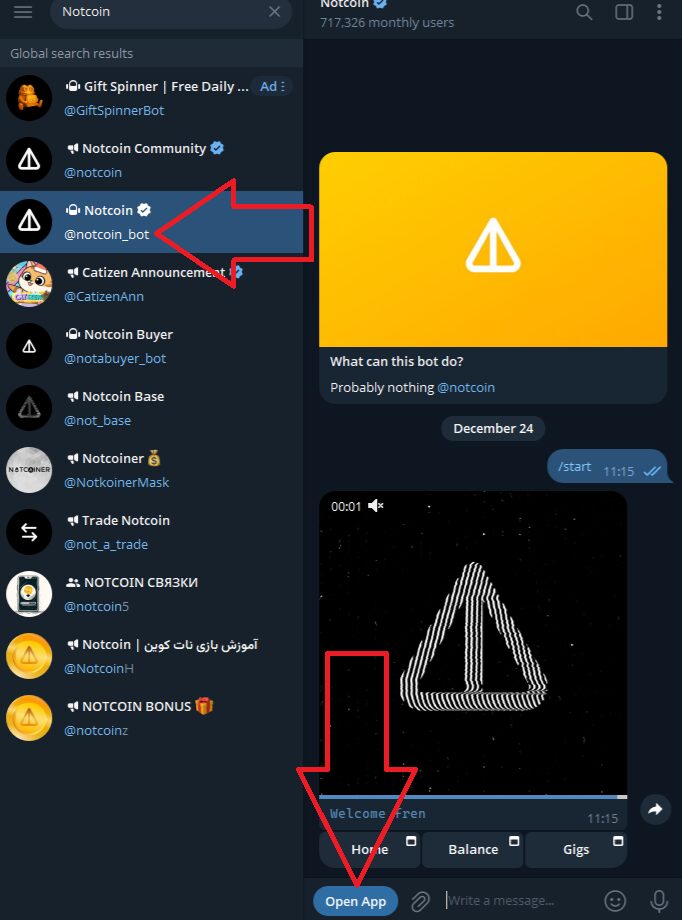
- In the top search bar, type:
Notcoin. - In the global results, look for:
- Notcoin with a ✅ check mark,
- handle
@notcoin_bot, - a huge monthly user count.
- Click / tap that entry.
You should now see a bot preview panel with the familiar black-and-yellow warning icon image and a short description like “Probably nothing”.
If you prefer direct links, the format is:
Open that and Telegram should drop you into the same bot chat.
2. Open the Notcoin mini-app from the bot
Once you’re in the @notcoin_bot chat:
- Tap Start or type
/startif you haven’t used it before. - The bot will send you a message with a big blue button at the bottom: “Open App”.
- Tap Open App.
Telegram will slide in a full-screen mini-app window. This is the main Notcoin app UI, not the old tapping game.

What you see in the Notcoin app
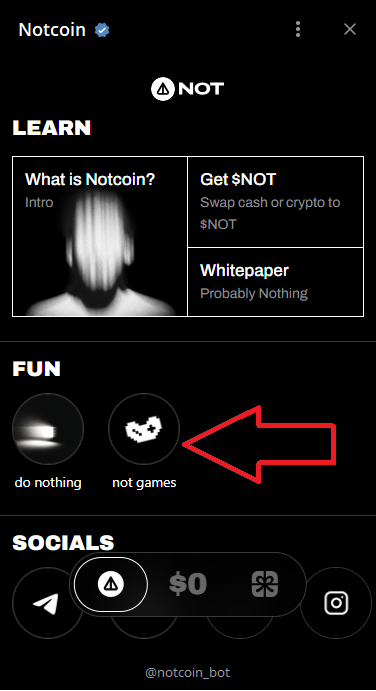
The layout can evolve, but you’ll normally see sections like:
- LEARN
- What is Notcoin? – an intro explaining the project.
- Get $NOT – ways to buy or swap into the NOT token.
- Whitepaper / “Probably Nothing” – deeper docs.
- FUN
- do nothing – a playful section / button.
- not games – this is the important one. It’s your entry into the new games hub.
- SOCIALS
- Icons for Telegram, X/Twitter, etc.
You’re now inside the “Notcoin universe” mini-app. But to actually play games, you still have one more layer to open: Not Games.
3. Open “Not Games” from inside Notcoin
In the FUN section of the Notcoin app you’ll see a round button labelled something like “not games” (with a small icon). That’s your portal to the gaming hub.
Step-by-step path to Not Games
- In the Notcoin app, scroll to FUN.
- Tap the “not games” button.
Telegram then:
- Minimizes the Notcoin app,
- Shows you a new message in the
@notcoin_botchat, coming from the Not Games integration.
The message preview usually explains Not Games as:
“Welcome to Not Games — your one gaming profile…”
…with a short description about playing games, unlocking achievements, cards, loots, market, etc.
- Under that message, tap the big Open button.
That opens another mini-app: this time the Not Games interface.
At the bottom of this new app you’ll see a navigation bar with tabs like:
- Profile – your inventory, cards, achievements.
- Games – the full list of games (this is where you’ll actually play).
- Squad – social / clan features (depends on how they roll it out).
- Market – where items and cards can be traded when enabled.
If that all felt like a lot of jumping around, you’re not alone. The structure is:
Telegram ➜
@notcoin_bot➜ Open App ➜ FUN → not games ➜ “Open” ➜ Not Games mini-app
From here on, you’re in the right place.
4. Browse the games list in Not Games
Tap the Games tab at the bottom of the Not Games app.
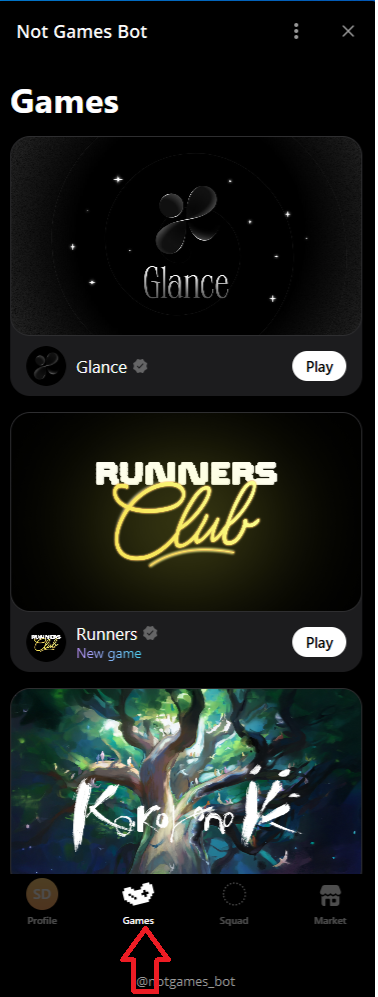
You should now see a scrollable list of games, each in its own card. Examples you might see:
- Glance – a minimal, moody black-and-white style game.
- Runners Club – more dynamic, runner-style feel.
- Koronki – colourful, fantasy-tree artwork.
Each game card typically shows:
- The game’s name and logo
- A short tag/label (e.g. “New game”)
- A Play button on the right
How to launch a specific game
- Scroll until you find the game you want (e.g. Glance, Runners, Koronki).
- Tap the Play button on that card.
Telegram then:
- Opens the game’s own mini-app screen,
- Keeps you authenticated via your Telegram / Not Games profile.
From there, each game has its own UI and mechanics:
- Some are quick arcade-style runs.
- Some feel more like collectible / card games.
- Some focus on story or progression.
The important part: progress and items usually tie back to your Not Games Profile, not just the individual game.
5. Understanding your Not Games profile, items and cards
Back in the Not Games app, tap the Profile tab at the bottom.
You’ll see something like:
- Your username / profile handle
- A join date or “since…” label
- Inventory / cards / lootboxes area
- Achievements, stats or milestones
The text in the Not Games info panel describes the system roughly as:
- “Play games. Learn how to win. Unlock achievements and earn items.”
- Transfers – cards, skins, lootboxes that you can move around.
- Crafting – combine items into profiles, shades, or other things.
- Market – buy/sell items in a marketplace where prices follow demand.
The details change as they add features, but the idea is consistent:
You have one gaming profile that connects across multiple Not Games titles.
Games can drop items/cards. Those items live in your profile and may be tradable or usable across games.
This is where the bridge back to Notcoin / $NOT can appear:
- Certain items or events may be linked to NOT-related rewards.
- Some games might use NOT as part of their economy.
- The market may eventually price items in NOT or another token.
None of that is guaranteed value. It’s just how the ecosystem is designed to possibly connect gaming and the token.
6. Where does $NOT fit into all this?
Notcoin started life as a tap-to-earn experiment on Telegram. That phase created a huge player base and, eventually, the $NOT token.
Now the Notcoin app plays a different role:
- LEARN – explains what $NOT is and how the project sees itself.
- Get $NOT – links to supported ways of swapping/buying the token.
- Not Games – gives a gaming layer where items and achievements can (in theory) connect back to NOT or future rewards.
The key for your expectations:
- Your Not Games items, cards and achievements might feed into future events or incentives.
- They do not automatically mean you’ll get a specific amount of tokens or fixed money value.
- Token prices, if you buy/swap, live on the crypto markets, not inside Telegram.
Think of it like this:
The Notcoin / $NOT side is the currency and ecosystem.
The Not Games side is the gaming and item layer on top of that.
How much those two layers benefit each other will depend on what the team actually ships over time.
7. A simple Notcoin + Not Games routine
If you want to use Notcoin and Not Games without falling into a rabbit hole, here’s a realistic low-stress routine.
Once in a while (not daily finance homework):
- Open
@notcoin_bot→ tap Open App. - Check the LEARN section for any big announcements or new docs.
- If you’re curious about $NOT itself, open Get $NOT and read what’s there.
- In FUN, tap not games → then Open to launch Not Games.
- In the Not Games app:
- Tap Profile to see your items and progress.
- Tap Games and pick one or two to play when you actually have time.
- Log off and treat it like normal gaming, not a job.
You don’t need to chase every game, every event, and every micro-quest to “not miss out.” That’s how people burn out.
8. Safety: clones, fake links and token hype
Because Notcoin is big and has a real token, it attracts scams. A few rules will save you a lot of pain.
Use only the real bots
- Main app:
@notcoin_bot - Not Games hub: opened via the “not games” button in the official Notcoin app, which then shows a bot panel before you hit Open.
If you see:
- weird spellings,
- bots with tiny user counts,
- or channels that don’t link back to
@notcoin_bot,
just walk away.
Never share your wallet’s seed phrase or private key
No legitimate Notcoin or Not Games flow will ever ask for:
- “12-word phrase”
- “seed phrase”
- “private key”
- or direct exchange logins inside Telegram
If you see that, it’s a scam. Close it.
Beware of DMs about “your airdrop” or “unclaimed rewards”
Scammers love to DM players pretending to be:
- Notcoin admins
- support staff
- airdrop managers
They’ll say your rewards are stuck and ask you to:
- click a shady link,
- pay a “small fee” to unlock them,
- or hand over wallet details.
Real teams post claim instructions publicly in verified channels and on their official site. They do not cold-DM random users asking for money.
Treat any investment like a total loss upfront
If you ever decide to buy $NOT or spend money on in-game items, keep it simple:
Only put in what you could completely lose without it hurting your life.
Notcoin is part of the high-risk, high-volatility crypto world. Fun to experiment with, not something to bet your savings on.
9. Quick recap
If you just want the core steps boiled down:
- In Telegram, open
@notcoin_bot(orhttps://t.me/notcoin_bot). - Tap Start, then Open App.
- In the Notcoin app, scroll to FUN and tap not games.
- In the chat, tap Open on the Not Games message.
- In Not Games:
- Use Profile to see your items and progress.
- Use Games to browse and hit Play on any game you like.
From there, treat it like a normal gaming platform with a crypto flavour:
- enjoy the games,
- collect items if you want,
- keep your security tight,
- and see any token upside as a bonus, not a promise.
That’s the clean, modern way to use Notcoin and Not Games without getting lost in old tap-mining guides or sketchy clone bots.