Catizen Telegram Mini-App: How It Works, How to Farm, and What to Watch Out For
Catizen is one of those Telegram mini-apps you suddenly see everywhere: gold coins, cat avatars, people posting screenshots of massive balances and talking about “airdrop points.”
If you just tap into it from a random invite, the whole thing can feel confusing: there’s a cat-themed board, different currencies, tasks, boosts, and vague promises about tokens. This guide is here to make it boringly clear:
- how to open the real Catizen mini-app
- how the basic gameplay and farming actually work
- how to approach upgrades, tasks, and referrals without losing your mind
- what to watch out for around tokens, wallets, and scams
Treat this as a “how it really works before you go hard” walkthrough.
Quick Start: How to Open Catizen on Telegram
1. Use the official Catizen bot
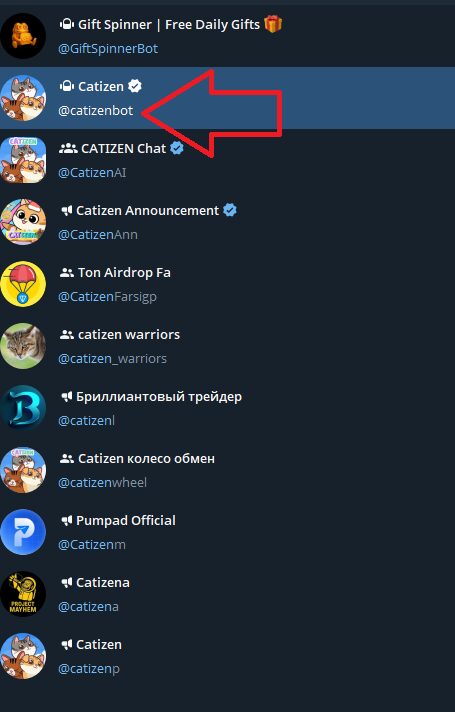
From your screenshot and the in-app branding, the official game bot is:
@catizenbot
Telegram link:https://t.me/catizenbot
You can open it in two ways.
Option A – Search inside Telegram
- Open Telegram (desktop or mobile).
- Type “Catizen” in the search bar.
- In global results, look for:
- the entry named Catizen with a blue check,
- handle
@catizenbot, - a very large monthly user count.
- Click/tap that result to open the bot chat.
Option B – Use the direct link
- Open this link on a device with Telegram installed:
https://t.me/catizenbot - Telegram will prompt you to open the Catizen bot chat.
Always double-check you really see @catizenbot at the top. There are plenty of clones with similar names.
2. Start the bot and launch the mini-app
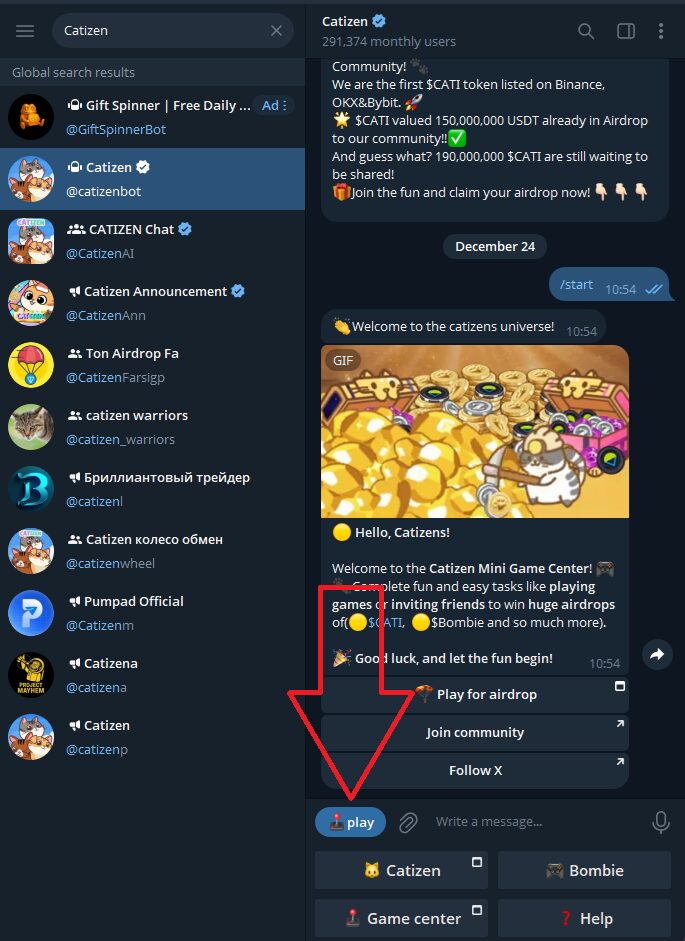
Inside the @catizenbot chat:
- Tap Start or
/start. - The bot sends a message with a big button like “Start”, “Play”, or “Open App.”
- Tap that button.
- Catizen opens as a mini-app inside Telegram.
If nothing appears:
- scroll through the chat,
- find that large Start/Play/Open button again,
- tap it one more time.
Once it loads, you should see a very cat-heavy interface with coins and UI buttons, not just plain chat messages.
3. First minute inside Catizen
On your first launch, Catizen usually walks you through a short onboarding:
- a basic explanation of the cat world,
- a quick demo of tapping/collecting,
- maybe an initial “starter” cat or two.
Within a minute, you should be able to:
- see your balance at the top,
- see cats or tiles on the main board,
- tap the screen to collect / earn,
- and open basic UI sections like Tasks and Shop/Boosts.
If you can get this far, you’re set. Everything else is just understanding what each piece is trying to do.
What Catizen Actually Is
Catizen is a Telegram mini-app game that blends:
- Idle / merge gameplay
- You manage cat characters on a board or “world.”
- Cats generate income over time or when you interact.
- You often merge or upgrade cats to higher tiers.
- Tap-to-earn mechanics
- Tapping, swiping, and completing actions earn in-game coins and points.
- Upgrades multiply your income and unlock new features.
- Speculative token / airdrop angle
- The game talks about its token (often branded as SCATI / CATI or similar).
- Your game progress might matter later for airdrops or rewards.
Important mindset:
Catizen is a game first. Any token or exchange listing is speculative until you actually see it live on a verified platform and can withdraw something yourself.
If you go in expecting a cute idle game with possible upside instead of guaranteed payouts, you’ll have a much better time.
The Main Screen: Cats, Coins and Core Loop
Once you’re through the intro, most of your time is on the main Catizen screen. The exact design can evolve, but it usually includes:
- Top bar
- Your primary coin / point balance.
- Sometimes premium currency or event tokens.
- Middle board / world
- Your cats live here.
- You might have tiles, rooms, or zones where cats sit and generate income.
- You can often merge cats of the same level to make a higher-level cat.
- Bottom / side navigation
- Tasks / Quests – daily missions and long-term goals.
- Boosts / Shop – upgrades, multipliers, maybe skins or cosmetics.
- Friends / Referrals – invite links, social rewards.
- Sometimes Events / Airdrop / Token buttons.
How the core loop works
Most Catizen sessions look like this:
- Collect income
- Tap or interact with cats or the board to collect coins/points they’ve generated.
- Manage cats
- Merge duplicate cats to create higher-tier ones.
- Higher-tier cats usually produce more income.
- Upgrade and expand
- Use coins to buy:
- new cats,
- more tiles/slots,
- or global upgrades that boost income across your whole board.
- Use coins to buy:
- Repeat over time
- Close the game; cats keep generating income in the background (to some extent).
- Come back later, collect, merge, and upgrade again.
It feels similar to other merge/idle games on mobile, just running inside Telegram with a token story layered over it.
Cats and Upgrades: Where Progress Really Comes From
In Catizen, your cats are your engine. The game usually nudges you to:
- keep upgrading your cats,
- maintain a board full of higher-tier cats,
- and avoid wasting space on lots of low-tier ones.
Typical cat / board mechanics
While UI details can change, you’ll usually see:
- Cat levels
- Level 1 cats → weakest, cheapest.
- Merge two level 1 cats → level 2 cat, and so on.
- Each level jump significantly increases income per cat.
- Board slots / capacity
- Limited number of spaces for cats.
- Upgrades can unlock extra slots.
- A full board of low-tier cats is worse than fewer high-tier ones.
- Cat shop / egg system
- Spend coins for basic cats or “eggs” that hatch into cats.
- The more you buy, the more low-tier cats you can merge.
General strategy:
- Keep your board tidy – constantly merge duplicates.
- Prioritize unlocking more slots so you can merge efficiently.
- Use your coins to:
- buy new basic cats,
- and invest in global upgrades that buff all cats’ output.
Tasks, Quests and Events
Catizen pushes progression through daily tasks, quests, and events. This is where a lot of your extra rewards come from.
Expect a Tasks / Quests / Missions section with things like:
- daily login rewards
- “collect X income today” challenges
- “merge Y cats” or “reach level Z cat” missions
- tasks to visit other sections (events, minigames, social stuff)
There may also be larger event panels, especially around:
- token-related milestones,
- seasonal or themed promotions,
- special cats or limited rewards.
How to approach tasks without drowning in them
You don’t need to clear every single task to enjoy or progress in Catizen.
A sane approach:
- Always claim:
- daily login / streak rewards
- any “free chest / gift” that appears at the start of a session
- Focus on:
- tasks that align with what you’re doing anyway (merging, upgrading, collecting)
- big one-time rewards that unlock more capacity or cats
- Ignore or delay:
- tasks that push you into random partner channels that feel spammy
- things that require too much time for small rewards
A quick daily routine is usually enough:
- Open Catizen, grab daily rewards.
- Clear 3–5 easy tasks that mesh with your normal play.
- Let the harder tasks complete naturally over a few days or weeks.
Boosts, Multipliers and “Spicy” Buttons
Like most idle games, Catizen includes ways to spike your income briefly:
- Temporary multipliers – x2, x3 income for a limited time.
- Speed boosts – cats produce much faster for a short window.
- Special chests or lucky draws – random bonuses, sometimes gated by watching something or performing a specific action.
These can be fun and powerful, but they’re also where people burn through premium currency or watch endless promos for very small gains.
Basic rules of thumb:
- Use multipliers when:
- your base income is already high,
- you’re about to play a decent session (not just 2 minutes),
- you have lots of cats ready to generate/merge.
- Don’t stress if you miss a boost:
- The core of your progress still comes from a strong board and sensible upgrades.
- Be careful with anything that costs real money or paid currency:
- Only spend what you’re genuinely okay never getting back.
- Don’t buy bundles just because a timer is counting down.
Referrals and Social Features
Catizen, like other Telegram mini-apps, lets you invite friends for extra rewards.
Inside the app you’ll usually see a Friends / Invite / Referral section with:
- your unique invite link,
- a summary of what you and the invitee get,
- tracking of how many players you’ve brought in.
Referrals can add a nice bump to your progress, but they’re optional. You can absolutely play Catizen alone.
Good practices:
- Share your link with people who actually like cats and idle games.
- Use platforms that allow referral links openly (groups where it’s expected).
Avoid:
- spamming random groups and unrelated chats,
- buying fake referrals or using bots,
- creating multiple dummy accounts just to self-refer.
If Catizen ever runs an airdrop based on “real users,” obvious abuse patterns are the first ones they’ll try to filter out.
Tokens, Airdrops and What Your Catizen Balance Might Mean
You’ll see a lot of talk around Catizen’s token (often branded as $SCATI / $CATI or similar), exchange listings, and airdrops.
The usual pattern for games like this:
- They host a farming phase where players build up balances and complete tasks.
- At some point, they announce a snapshot or cutoff date.
- They use the data from that snapshot (balances, activity, referrals, etc.) to decide:
- token allocations,
- VIP status or perks,
- access to future events.
The important part: details can change.
- Snapshot timelines can move.
- Eligibility rules can tighten (e.g. only active, non-bot accounts above a threshold).
- Token value is unknown until it’s actually live and tradable, and even then it can be volatile.
Safe mindset:
Think of your Catizen progress as lottery ticket entries, not a bank balance.
To keep track without going crazy:
- Follow the official Catizen channel linked inside the game.
- Read anything pinned about:
- snapshots,
- token distribution,
- wallet connections and claim windows.
Ignore random rumors in unrelated Telegram groups about guaranteed payouts or huge fixed rewards.
Wallets, Claims and Exchanges (If/When That Happens)
If Catizen eventually lets you claim tokens or move value off the game, it will likely involve:
- connecting a crypto wallet,
- signing a message or transaction,
- or using a supported exchange or TON wallet.
Standard safety rules:
- Never give your seed phrase or private key to any site or bot.
- Not to Catizen, not to an “airdrop helper,” not to “support.”
- Ideally use a separate wallet for experimental projects.
- Keep long-term savings in a different, more locked-down wallet.
- Carefully check URLs:
- Make sure any claim page domain matches what Catizen posts in its official channel.
- Confirm it’s using
https. - Watch for subtle misspellings or extra letters.
- Be wary of:
- “deposit first to unlock your tokens” schemes,
- random DMs claiming to help you claim,
- requests for remote-control tools or screen sharing.
If something feels rushed, confusing, or overly complicated, pause and wait for clearer information rather than forcing it.
A Simple Catizen Routine That Actually Fits Real Life
To keep Catizen in the “fun little side project” category instead of a full-time job, you don’t need to grind.
Here’s a realistic routine:
Once or twice per day:
- Open
@catizenbot→ tap Start/Play/Open App. - Collect income from your board.
- Merge cats:
- Clear low-tier duplicates,
- aim for higher-tier cats filling the board.
- Spend coins to:
- buy new basic cats/eggs,
- unlock extra slots,
- upgrade any global income boosts.
- Open Tasks / Quests:
- claim daily login and quick missions,
- complete 2–5 easy tasks that align with what you’re already doing.
- Use boosts only if you plan to stay for a proper session.
- Close the mini-app and let your cats work in the background.
That’s enough to keep your account steadily growing during any farming season without feeling chained to Telegram.
Red Flags and Safety Checklist for Catizen
Because Catizen is popular and talks openly about airdrops and tokens, it naturally attracts copycats and scammers. A quick checklist helps you stay out of trouble.
1. Confirm you’re using @catizenbot
- Only play through the verified Catizen bot with the handle
@catizenbot. - Use
https://t.me/catizenbotor the link from the official Catizen channel. - Ignore bots with similar names, low user counts, or off-brand logos.
2. Never share your seed phrase or private key
No matter what the message says:
- Catizen doesn’t need your seed phrase.
- Exchanges don’t need your seed phrase.
- Anyone asking for it is trying to drain your wallet.
3. Be suspicious of DMs about “problems” with your airdrop
Scammers love to DM people pretending to be:
- Catizen support
- airdrop managers
- special “admins”
They’ll say things like:
- “Your Catizen airdrop is blocked, click here.”
- “We need a fee to unlock your rewards.”
- “Send us your wallet details to verify.”
Real teams share claim instructions in public channels, not in random private chats.
4. Keep your expectations realistic
Even if the token launches and you qualify:
- not every player will get huge rewards,
- markets can be brutal,
- and many airdrops end up being modest.
If you keep your time and money investment small, any upside is a nice surprise instead of a make-or-break moment.
Final Thoughts
Catizen is part cat-collecting idle game, part Telegram social experience, part speculative token farm. When you strip away the noise, it’s basically:
- find
@catizenbot→ open mini-app, - build a strong board of higher-tier cats,
- upgrade sensibly,
- clear a few daily tasks,
- and wait to see what the team actually delivers on the token side.
If you treat it as a casual experiment, use the official bot link, protect your wallet, and keep your expectations modest, Catizen can be a fun way to explore how this new generation of Telegram mini-apps works—without turning into a headache.